Leaderboard




Popular Content
Showing content with the highest reputation on 11/26/2026 in all areas
-
Happy Thanksgiving fellow travelers and campers! Mike5 points
-
4 points
-
We Hope Everyone and their Family has a Great Thanksgiving! Best Regards, Bill and Debbie3 points
-
And it makes great conversation topic around a campfire.3 points
-
Happy Thanksgiving2 points
-
You speak the truth. The reason I went with this was primarily because I already had most of the gear lying around not being used and also because I am a technology guy and enjoy it. But I'm not poring over graphs when I'm out camping! This is part fun / part diagnostic tool.2 points
-
Impressive technological effort folks. I am continually amazed at the ingenuity displayed by Oliver owners. What's really interesting are the types of the upgrades posted on the forum. Ten years ago, they tended to focus on best ways to alter this or that mechanical system, physical leveling products, how to's, AGM's v lead acid, the "hard" goods of an Oliver. Today we have folks automating the systems - as seen in this thread- routers, custom electronics, interfaces and programming we never thought about in 2017. (Some didn't exist back then) I also believe - to some extent- why we become Oliver owners - RV-people- has also migrated towards a more modern - less get back to the wilds of nature- kind of experience. Honestly, I sometimes experience a little cognitive dissonance. I spend a good deal of effort towards escaping the "modern" world, only to arrive in the backcountry hoping my modern conveniences have a signal... ????? The cool factor is off the charts, to be sure, but I push back, my inclination is to reduce, eliminate, if possible, all connection with this culture, and simply exist in the "natural" analog world. I dip my toes- back and forth- some trips are to the back country of Dinosaur National Monument- and others in a parking lot RV park- with full hookups - in Yellowstone, or perhaps, just outside some POI. Confused - but grateful. The Oliver allows us to experience almost any level of comfort - in as many locations we can reach. While many are tickled to know every data point, of all systems on board, some prefer the simplicity of the basics. Stuff is working as designed, leaving me to enjoy that backcounrty trail. Happy Thanksgiving to all. RB2 points
-
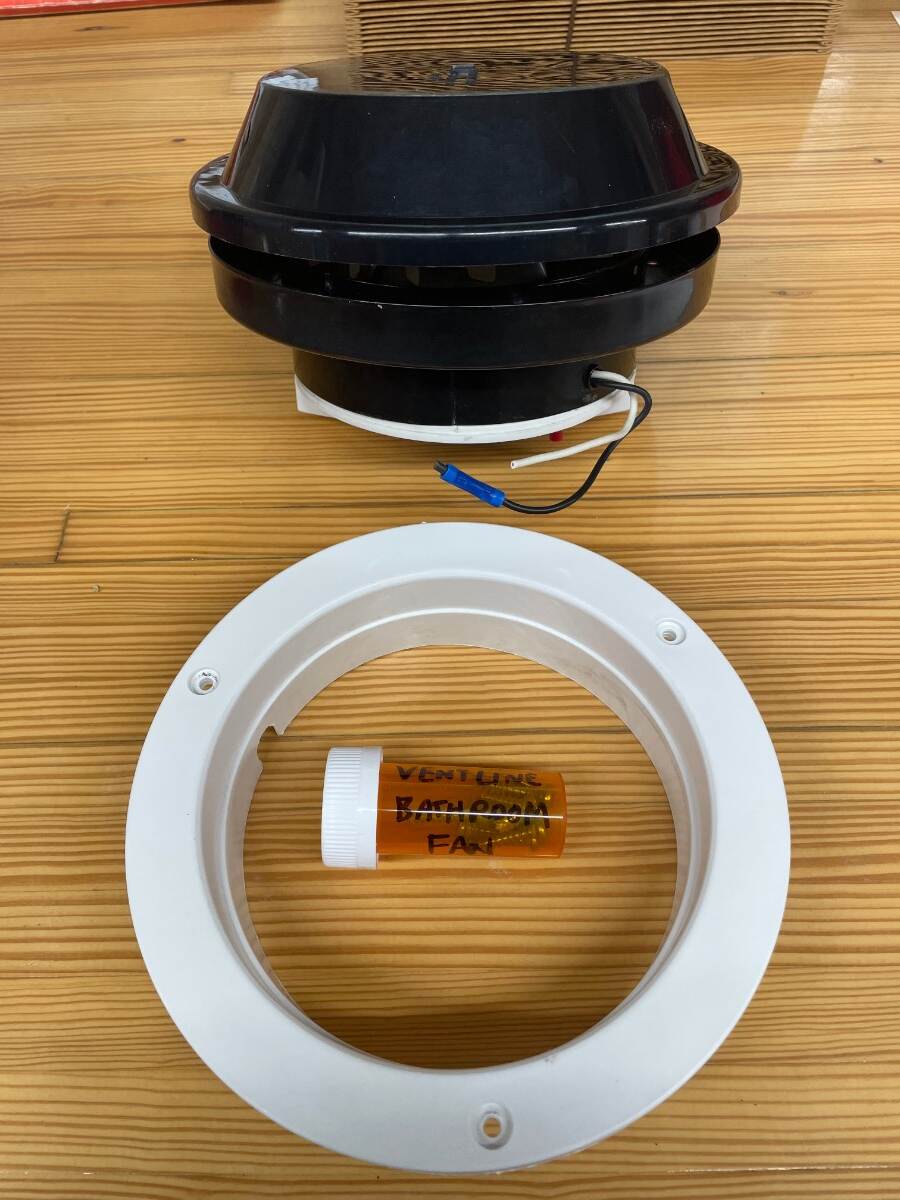
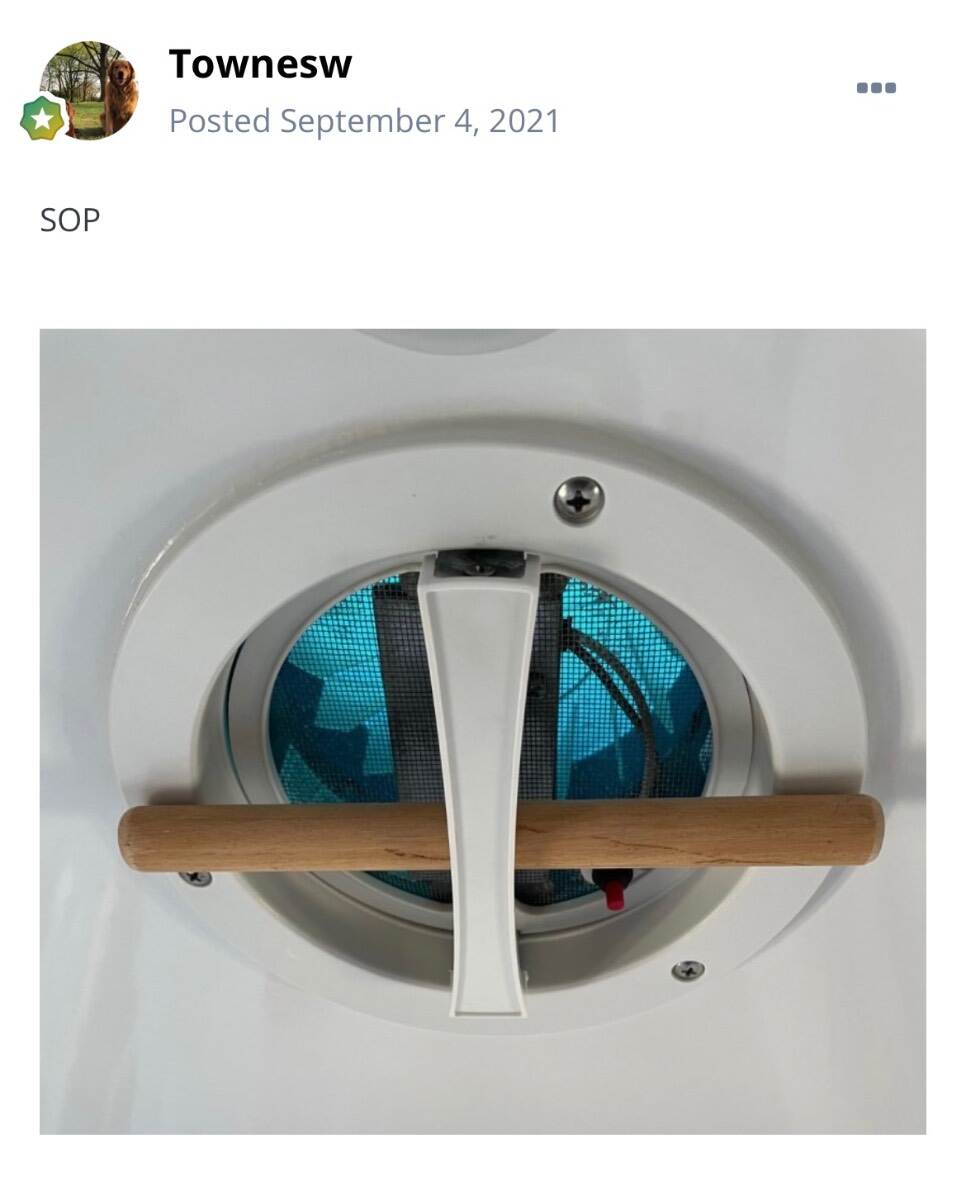
Removed from 2018 OEII hull 313. Good condition. Includes mounting hardware. Reason for removal: replaced with MaxxFan Dome. Sometime in the past I replaced the impeller and installed an EPDM foam seal in place of the open cell foam seal. I will include the wooden dowel that we used to keep it closed when traveling. You pay shipping. I will ship from 38261 when I find a suitable box. Bill
 1 point
-
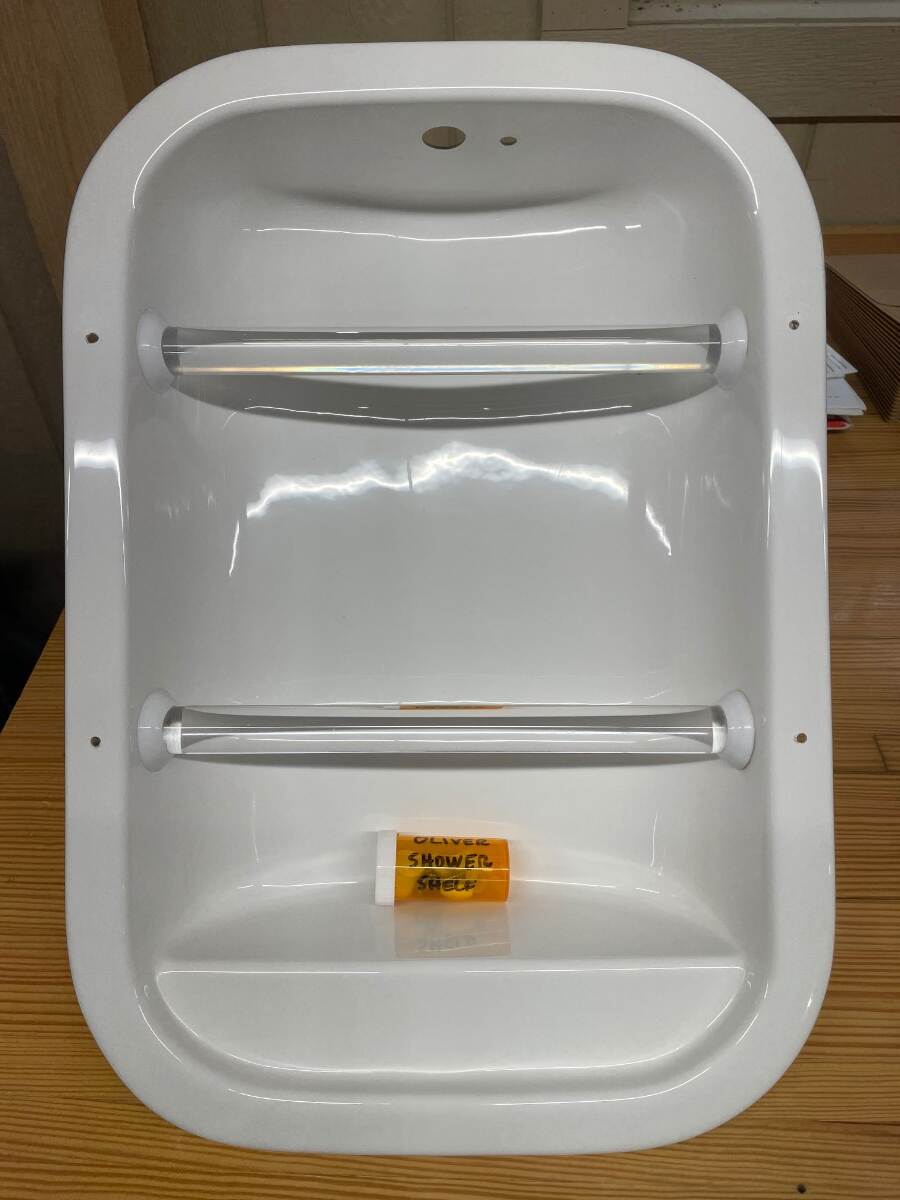
Removed from 2018 OEII hull 313. Perfect condition. Includes mounting hardware. Reason for removal: replaced with a marine hatch. You pay shipping. I will ship from 38261 when I find a suitable box. Bill
1 point
-
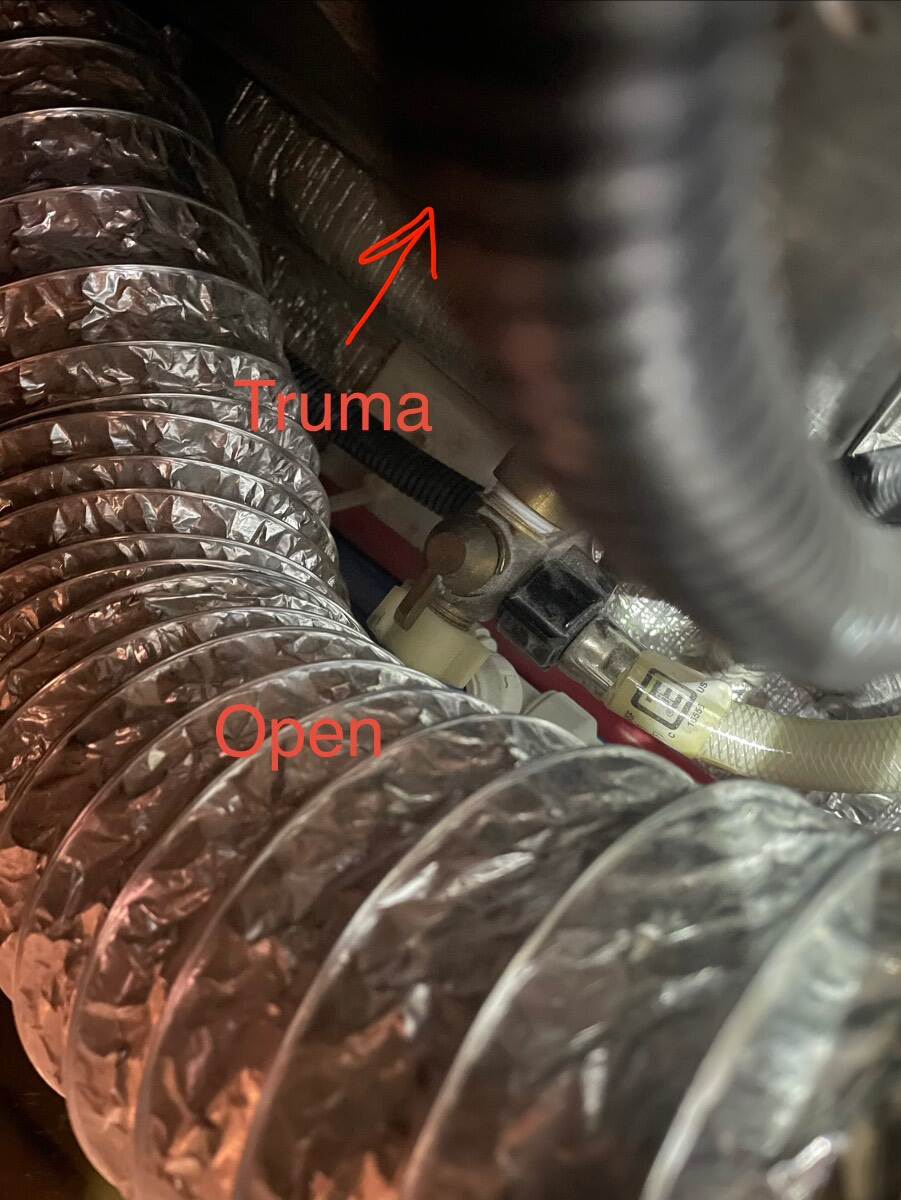
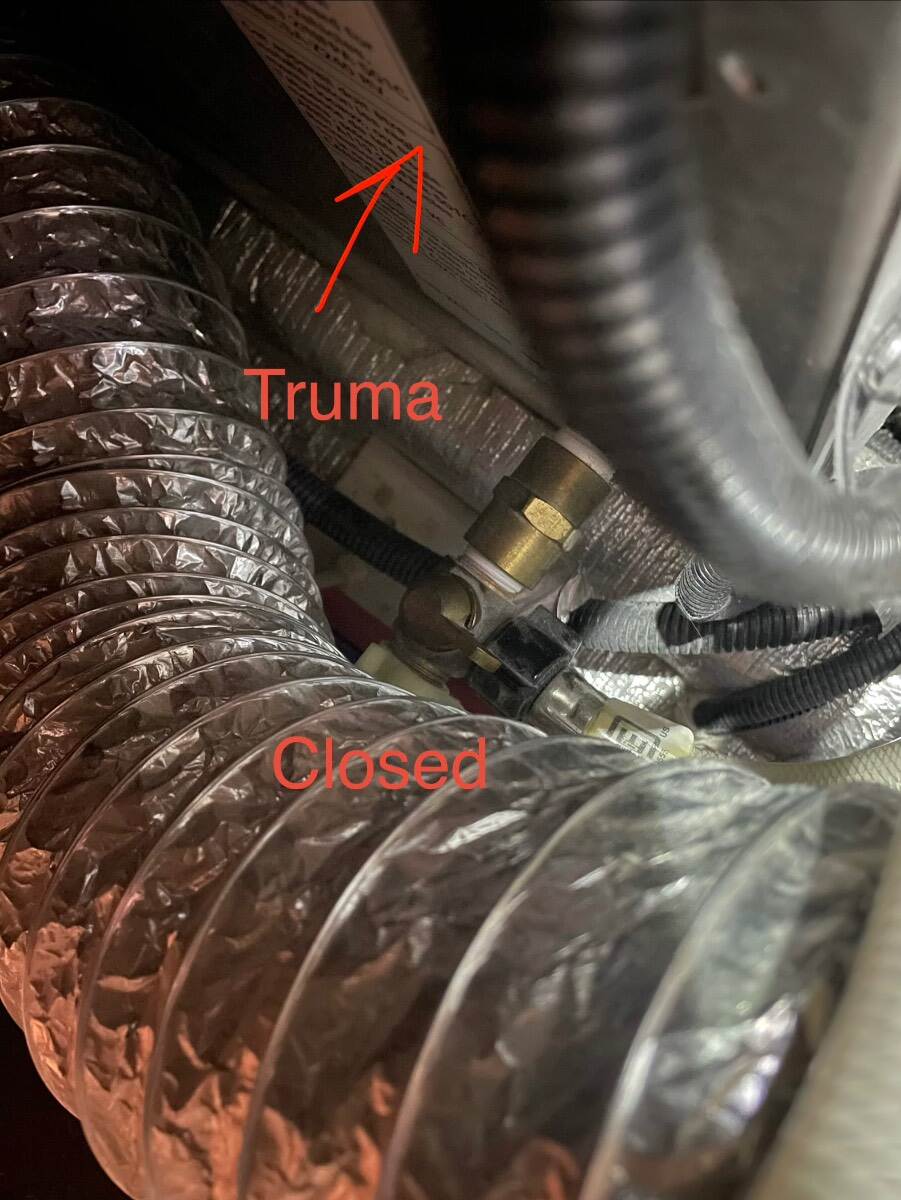
My valve handle fell off a couple of years ago. Finally and with a mirror, I found it. It cant go far! I fished it out, put it back on, and tighten the hex screw nice and tight. Havent had the problem since but i keep an eye on it.1 point
-
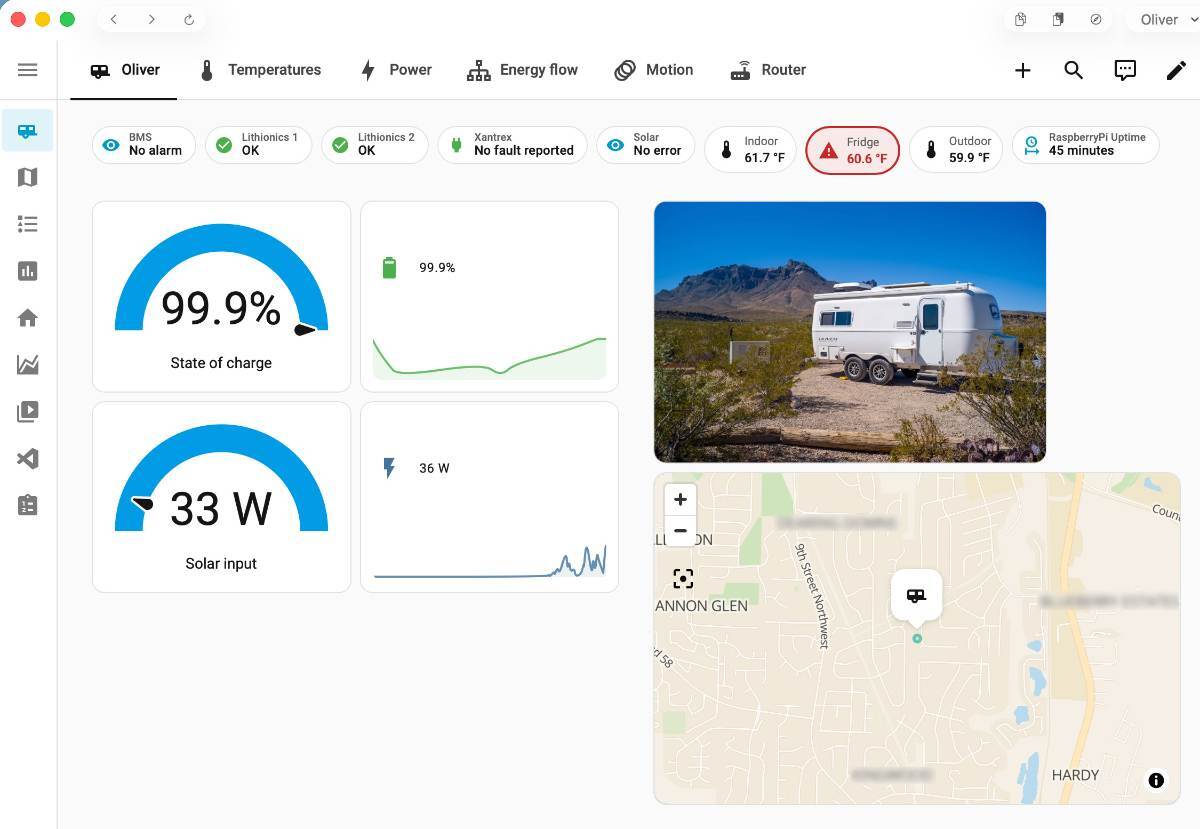
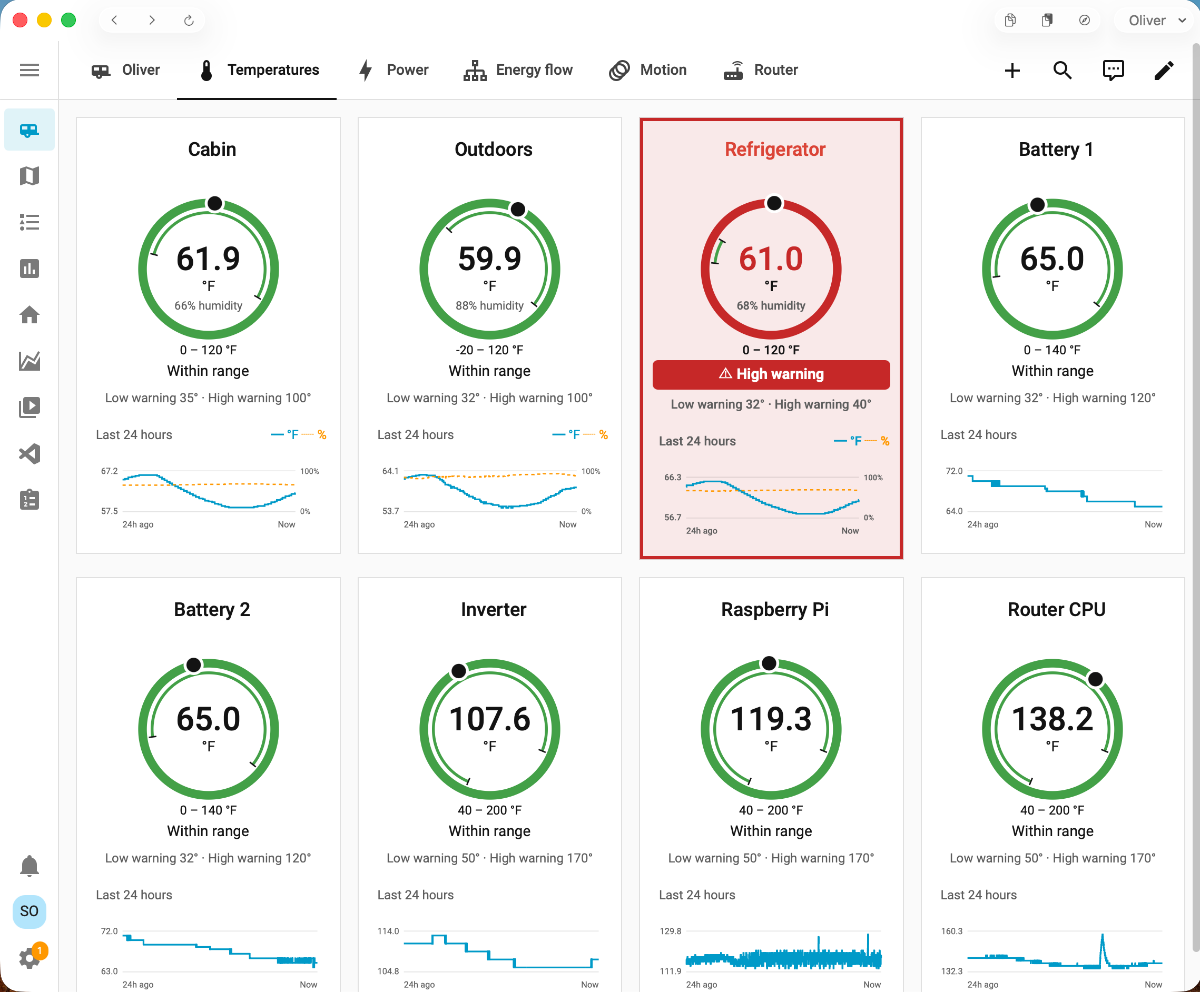
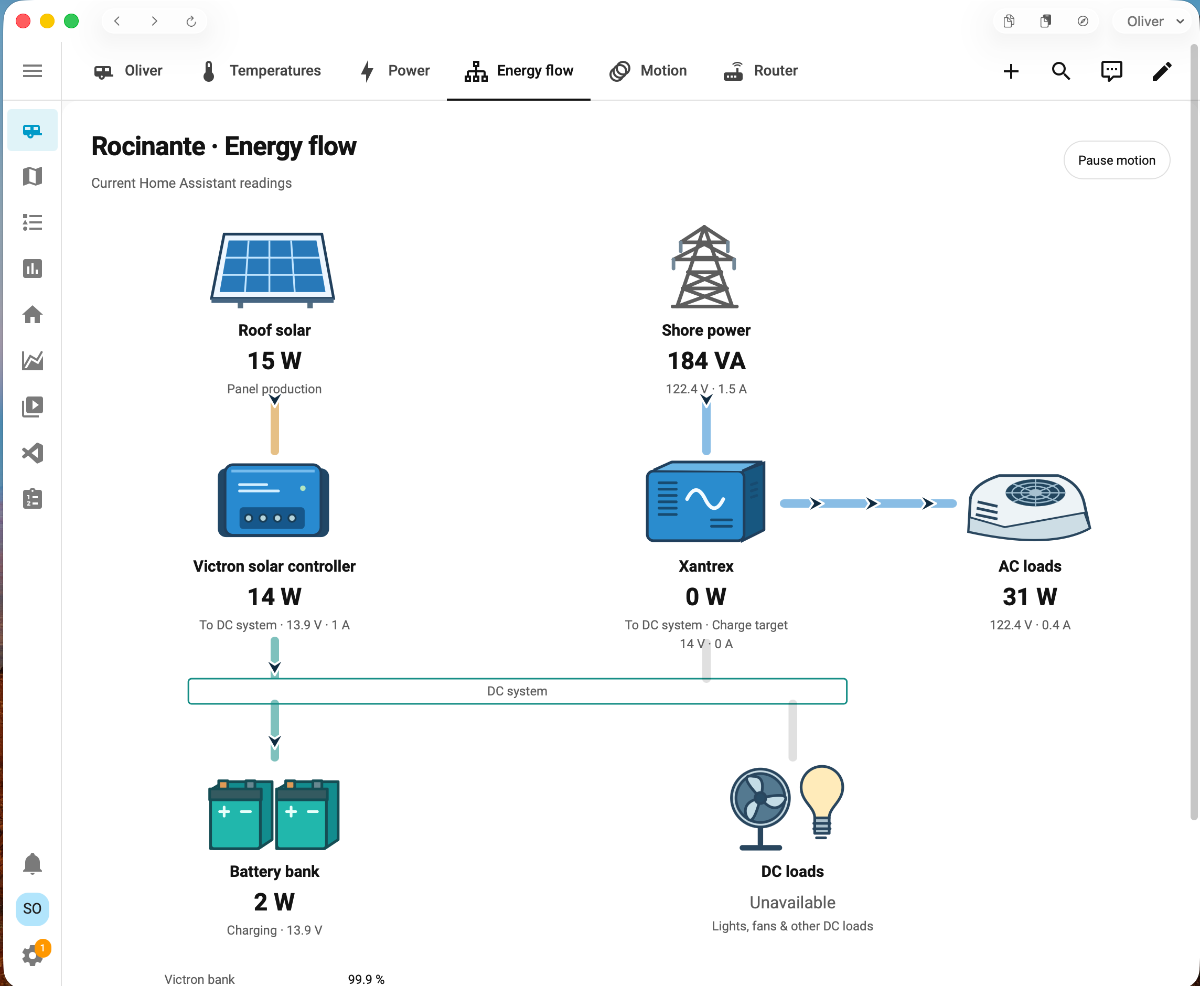
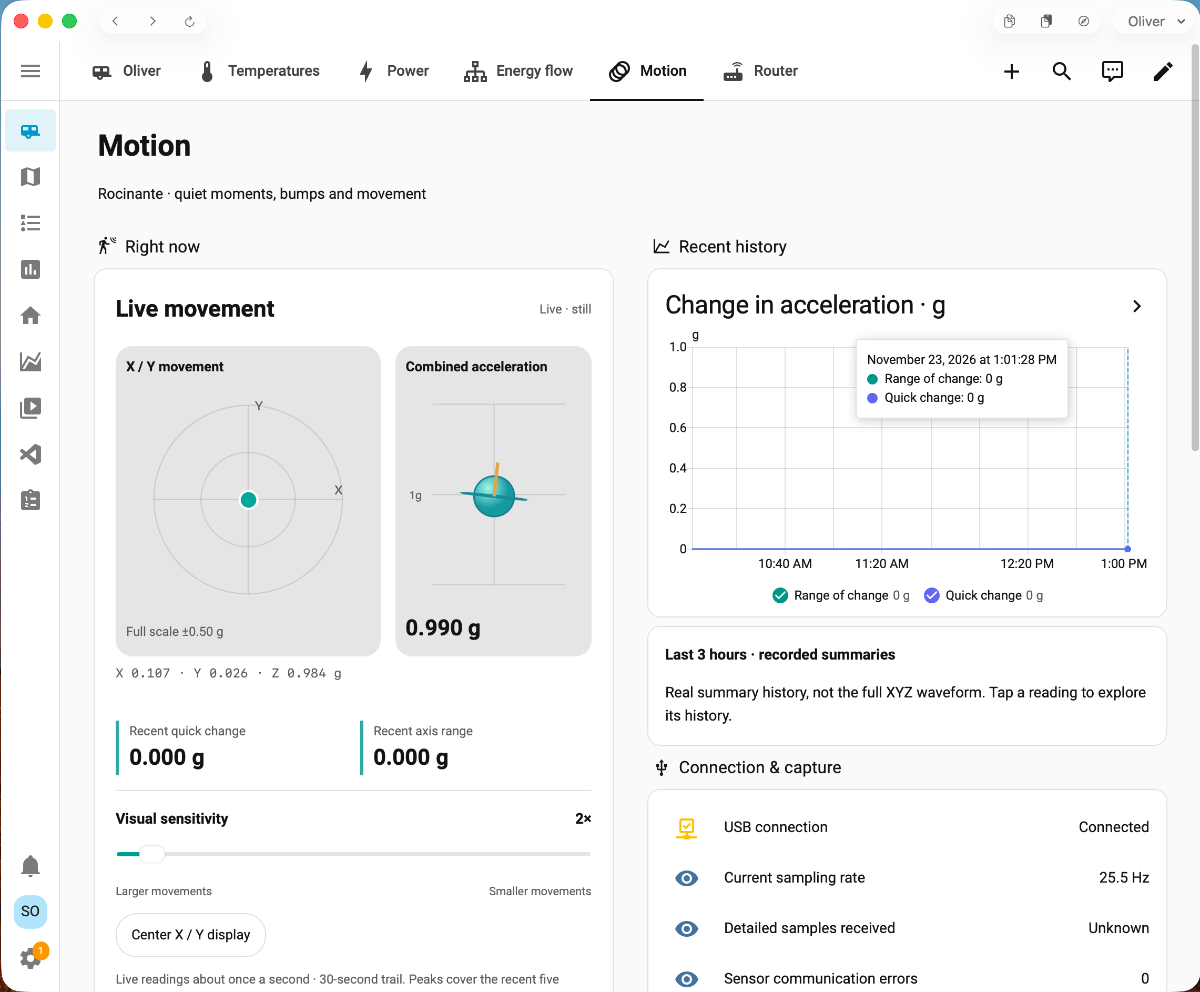
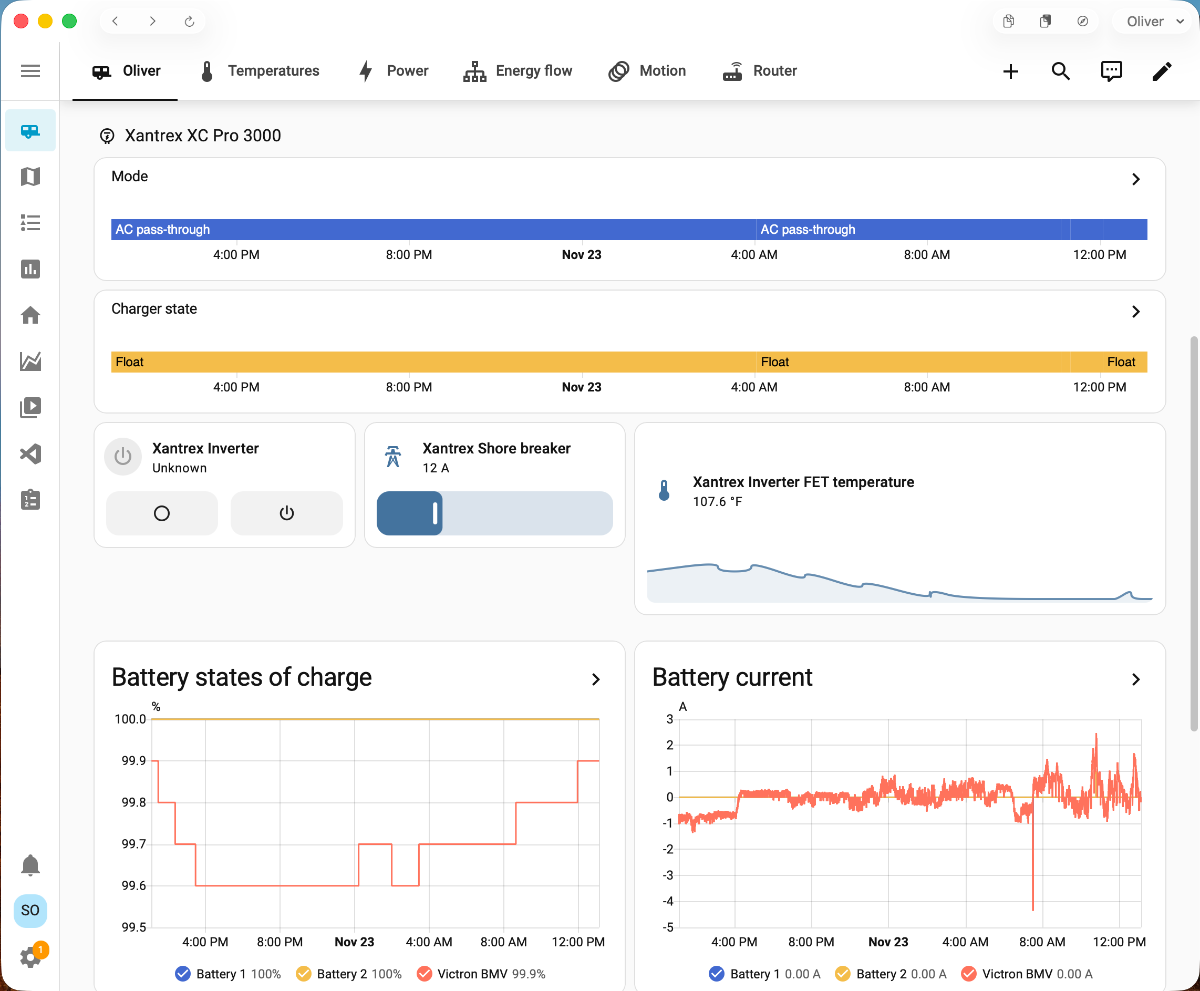
I recently added a small single-board computer (Raspberry Pi) to my Oliver and a few other doodads that integrated everything into a single application called "Home Assistant". This is meant for home automation and control. Open-source, completely free. Rather than go into the details, I'll just show a few screenshots here. If anyone is interested in how/why, let me know and I could also do a "mods" video and show all the details. I sort of went down the rabbit hole on Home Assistant 😂. Here's the main screen- it shows a group of alarms across the top, from Victron, batteries, Xantrex, etc. I also have some little bluetooth temperature/humdity probes. I bought a 3-pack from Amazon and they were pretty cheap. One is mounted in the cabin, one under the propane cover and one in the fridge. You can set warning for high/low temp, so that's why the fridge is showing an alert (since it's turned off). I added a USB GPS receiver to the Raspberry Pi and it will display a little map of where the Oliver is. The "Temperatures" screen has all the temp/humidity sensors on one page The "Energy Flow" page is pretty interesting: I also added a 3D-accelerometer, but it is still an experiment. I plan on fixing the sensor to the hull and then implementing some kind of helper for leveling. I also wanted to track the amount of bumps and swaying that happen while towing. Not showing much right now since it is parked. Still playing with this one: More stuff on the main page: All this stuff is wired in and installed beneath the aft dinette seat. All the stats are logged indefinitely for now on an SSD drive, so you can pick a date/time range and see what was going on. I'm a bit of a geek if you can't tell 😁 One the very best benefits of all this is that I can see it from the HA app on my phone. I can also control things with the phone- I can remotely turn on/off the inverter, which lets me set it up so that I can go out and then use my phone to turn on the inverter (and AC if it is turned on). I think the only thing that is not being monitored is the fault code from the Progressive Industries EMS box. Let me know if you have any questions! -Steve
1 point
-
90 degrees CCW is CLOSED in 2018 hull number 313 I meant to respond to your question early this morning but got busy doing other stuff.
1 point
-
Happy Turkey Day to all. And Thanks Bill and Debbie. We just got back from a very wet "Thanksgiving in the Woods" rally at Paynes Prairie State Park in Florida. Was a good trip though. Deciding where to go in December, maybe back to Paynes Prairie, but we will see.
1 point
-
Can't tell from your photos but if the valve has a "stump" sticking up and if you can access the stump with plyers, turning it 90 degrees away from the perpendicular water line should close the valve. If there is no stump you could try needle nose plyers to grab whatever the brass handle attached to. I think you can test to make sure it's closed by running water into the trailer line. Drain the water heater by moving the yellow latch down and removing the filter/antifreeze filter. Leave the water heater's yellow latch down with the filter/antifreeze filter removed. Turn on the water. If the valve is closed, water should not flow out. If you already have antifreeze in the water lines you will have to re-winterize the lines if you test the water heater like this. Tony1 point
-
Ohh you’ve got an evil mind! 😈1 point
-
Yes, Happy Thanksgiving, everyone!
1 point
-
Impressive effort and post. Another benefit is that one could also think of your system as a theft recovery tool. Sort of like "Home Alone". Whoever has stolen, or you just don't like if they borrowed your rig, you could make their life miserable! Full Heat, Full Cold, Lead Zepplin at 2:00 A, Rap at 3:00 AM, strobe lighting every 13.5 minutes randomly, drain the freshwater tank when they are 50 miles from a refill, lock up the brakes when in front of a police station... Oh, the fun that could be. Maybe turn it into a Home Alone #4! Rabbit Hole Society: You are getting close for sure...... GJ1 point
-
Another really game-changing aspect is the Oliver's local network. I had never heard of a "travel router" before, but they are very small wifi routers that connect and are powered by USB. The way they work is you have all your devices connected to the travel router's wifi always. When you travel, you can use the travel router to connect to different things, like a campground WiFi, or Starlink or whatever. That way, you don't have to reconnect all your devices. Plus it provides a layer of security over just using a public wifi. Along with that, I use a service called Tailscale, which is really great. It allows your devices to join a private VPN and they can communicate over the public internet. That's how I can connect my phone from anywhere to the Oliver. Tailscale is free with a limit of 100 devices. I think I have 7- like mac, iphone, ipad, oliver, a few others. I know it's a lot of information if you're not interested, but I am tickled with how it works and how much it costs, other than the doodads I bought to get it all hooked up. No monthly service fees!1 point
-
Well, thanks so much! I actually started thinking about a display and I wanted e-ink, but got hung up on the mounting and the powering (plus the $) so I just went with the Home Assistant apps for mac/iphone/ipad. You make a good point about using the accelerometer for compensating for the tanks. I thought about adding my own sensors and just leaving the SeeLevel ones in place. ... I'd also really like the propane level- Might could put a load cell under the tank and weigh it... There is custom code, not only for the UI but also integration for the accelerometer which is a custom little board I made. I used Codex to write most of the code... I setup the credentials and the Oliver was out in the driveway and Codex was logging into it and configuring. The most painful part of the whole deal was paying $49 and waiting 3 weeks for the Xantrex 40-pin connector!1 point
-
Steve, great work! You're very tenacious for getting this done. Hats off to you, and thanks for sharing! I had thought of doing something like this with a Pi, but with a built-in display for both the trailer and truck to include DC to DC charger performance. Anderson now makes high amp connectors with up to 8 auxiliary wires that might be adaptable, even for an AC switch!. But what I really wanted was accurate tank and propane levels. The Mopeka sensors work with Home Assistant, and I heard they are better than they used to be. But I was waiting for the radar based ones to develop and come down in price. The other problem is that the Oliver’s fresh and grey water tanks are so long and shallow that being even slightly off-level throws off the reading. Wait… your accelerometer could fix that! The Pi could calculate the tilt and correct the tank reading. Reading the Lithionics batteries over Bluetooth was very clever. Were you able to do everything within Home Assistant, or did you have to write some code? Some of the pages look custom. I figured you must be reading the Xantrex over both the RV CAN bus and Bluetooth, again very clever. This was always a hold-up for me, and one reason I never went with a Cerbo as an option... as well as its very limited inputs. I'd love to see your list of integrations, add-ons, and any custom cards you're using. Cheers! Geoff1 point
-
Thanks! Most everything is bluetooth (Victron, solar panels, solar charger, batteries, temperature sensors). I have a travel router (which I didn't mention), that is connected via ethernet. The GPS receiver connects via USB. The Xantrex was the tough one (and the best one to have). It has bluetooth, but in my experiments, it would disconnect immediately whenever I tried to send it a command. I think their phone app must have some "secret handshake" before it will work. So, I ordered a 40-pin connector that connects to the Xantrex and gives you a CAN bus interface over a shielded twisted pair cable. I then used a cheap ($20) USB CAN bus adapter connected to the Pi via USB. The Xantrex implements a subset of CANBUS called RV-C (RV industry related), so all the reading of values and setting variables is using the public RV-C protocol.1 point
-
Several Oliver owners have installed the Orion XS DC-DC charger to take advantage of excess power created by the truck alternator to charge the house batteries. What a great accessory to have for those who generally camp unplugged! What if after camping for a few days with the tow vehicle parked, you left an interior light on or something and the TV batteries drained? Can't start the engine! Have you worried about this when well off the beaten path? I have, so I carry a 10 AWG extension cord and a 10A battery charger with us when traveling, just in case. Some of us have camping accessories mounted in the TV. We have a Dometic CFX5 45L in the pickup bed. We also have a router/Wi-Fi/Starlink setup, a whole system of electrical equipment installed behind the back seat of the TV. It draws 1.5A 24x7 and double that number when Starlink is running. The CFX5 is rated at 7.2A on 12VDC though it uses about 4A on average. This is a lot of hardware to run on the TV starter batteries, so some install a dedicated power supply. What I did was to add a 100W Renogy panel mounted to the truck toolbox and a small Victron MPPT 15A SC mounted inside the toolbox, all integrated to the starter batteries (see pic1). The SC has a separate LOAD output which is wired directly to the fridge (under the OnlyFire cover). It has worked well most of the time. By day end (when sunny), the TV starter batteries are at full charge and normally there is ample voltage to run through the night. On a short on trip recently, we packed up after 4 days boondocking and the TV would not start. The 2 starter batteries had gotten down to 11.8V! I got the charger and extension cord out and it took a 40 minute charge to start the engine. First off, after over a year of use, I think our Renogy panel is getting weak. The best reading I'm getting on a sunny Arizona day is 40W. It is the winter sky but even when I park uphill getting a better angle 40W is still the max. When it was new it regularly read from 60-70W on the app. So, my system needs some further troubleshooting and work, but there's something new for the Orion -- Orion emergency charging! With a Sept 2026 firmware upgrade, Victron added a new feature to the Orion XS (50A and 70A chargers, sorry not the 30A). It's amazing! So I parked the TV in front of the Oliver a couple days ago, connected the DC-DC cable and then drained the TV batteries on purpose. After 2 days with rain and clouds yesterday, it read only 11.9V this morning. In fact, either the Pepwave router or Arris Wi-Fi shut down so we had no Internet (our travel system is also our Home network). After a 15 minute 25A emergency charge, voltage on the starter batteries were up to 12.1V. I repowered the router system after starting this charge process a second time. This only uses 6Ah (25A / 0.25 hr) from your house batteries which anybody with LiFePO4 can afford. I repeated the reverse charge process four (4) times, waiting about 10 minutes in between (must wait 5 min). So I used 25A total of our 900 Ah store, was 99% and then 96% SOC which as soon as the sun comes out will recharge from the Oliver rooftop solar. Got the TV up to 12.4V which is certainly enough to start the engine. The new Orion Emergency Start is so cool (pic2). Note there is 6.2A (25A - 18.8A) difference between the two screens which means rooftop solar was adding about 8A less the 1.8A for normal stuff running. It's like we get a new charging system with only a firmware upgrade! 😎 https://professional.victronenergy.com/app/news/382
1 point
-
Thanks Dean, and I appreciate that as a new owner you're diving into your major mod head first, while reading, learning, and appreciating new ideas as you build your Oliver. The true learning is in the doing, so you must be learning a lot and soon should have the best yet Oliver electrical system out there. Yes, an installation is not final until field tested! 🤠 And it works. As you know, I started troubleshooting our Orion since recently it was not charging up to par. First thing I noticed was the new firmware upgrade and I installed it. My issue was fixed by properly configuring the voltage settings on engine shutdown detection. It took another day or two, since in the app I'm usually just reading V and A numbers. Then with another look there was the new symbol, looking like a check engine light. I clicked on it and the Start Emergency Charge notice came up. Before proceeding, I looked in the Orion 50 manual and found nothing. Then I searched online and found the technical press release (for warning screen print and Victron link see original post). Yes Scotty, it includes the 50A and new 70A chargers that share the same HW and SW platform (the 30A HW is obviously different and so must be the SW). Scotty is running a whole series of upgrades for a proper rebirth after 10 years of Oliver ownership! 😎 I do everything from apps, no Cerbo and display monitor. Every device on the Victron Connect app has the little gear top right for configuration/setup. When firmware upgrade is available it will have a visual notification. It's easy to spot and with a few clicks easy to install when in Bluetooth range of the device and the phone has service or Wi-Fi connection. It's a great safety feature for towing, knowing you can always recharge a weak starter battery. I wish the charge rate and time would be variable or what would be more useful for me would be 20A full hour charge. If your batteries are too low to start the engine, the quick 25A 15 minute charge is not nearly enough, so you may need to run it 2-3 times, 5 minute pause between charges. The picture shows the new engine icon (top left), 13.5V on the Input (house batteries) and 0.0V on the Output, since at the time the cable to the TV was disconnected (open circuit). When connected and engine OFF the Output will display the starter battery voltage. This number can be checked first to see if starter battery charging is necessary. 😎
1 point
-
When replacing my AGM batteries with Lithium’s I also put in a battery cut off switch. THen, in storage I shut off the batteries entirely. Even with everything off you will have some small power draws that add up over time. Also, I wouldn’t store at only 35%. The Battle Born tech told me to be at least at 50% before storing. I’m usually at 90% or higher when I park the trailer in our storage area. Then I shut off the batteries. If you don’t have a shut off switch, disconnect one of the ground cables on you batteries. Mike1 point












-
Recent Achievements
-